How-to
Teach conveyor tracking targets at the conveyor base frame
Short answer
Park the part with its origin on the conveyor base frame, create the conveyor work object with ufprog FALSE, store every target on that work object, and wrap the path between WaitWObj and DropWObj. The tracking offset is zero at teach time and the controller supplies it at runtime, so you teach with a still belt and no simulation clock.
On this page
- Why does the real-cell teaching loop stall in a virtual controller?
- Where should the part sit when you teach tracked targets?
- Why is a target taught there still correct downstream?
- How do you set up the conveyor work object?
- How do you store each target in the conveyor work object?
- How do you connect and release the part in the program?
- How do you verify the targets without re-teaching?
- Which conveyor parameters must match before you blame the targets?
- Questions asked
Teach every tracked target with the part parked on the conveyor base frame. You do not need the belt running, the simulation clock, or a part that has passed the sync switch: conveyor tracking adds one offset along the belt to a work object at runtime, so if that offset is zero while you teach, the stored coordinates are correct for every belt position. Park the part on the base frame origin, put a conveyor work object with ufprog FALSE under every target, and wrap the path between WaitWObj and DropWObj. The steps below give the setup, the program skeleton, the check that proves the targets are part-relative, and the parameters that must match the real controller before you blame the teaching.
Why does the real-cell teaching loop stall in a virtual controller? #
Starting the belt in a virtual controller means running the simulation, and the simulation starts the program and pushes the controller toward automatic operation, so the physical teach loop of waiting on WaitWObj with the belt running fights the simulation clock. On a real cell the loop is physical: place a part on the belt, run it past the synchronization switch, let the task sit on WaitWObj until it connects, stop the belt, then jog and store targets on the connected work object. In the virtual cell the conveyor mechanism, the encoder and the sync signal are driven by the simulation engine, so the belt moves only while the simulation runs. You end up fighting the clock instead of teaching. Stop reproducing the physical loop: teach with the belt still and let the controller add the motion offset at runtime.
Where should the part sit when you teach tracked targets? #
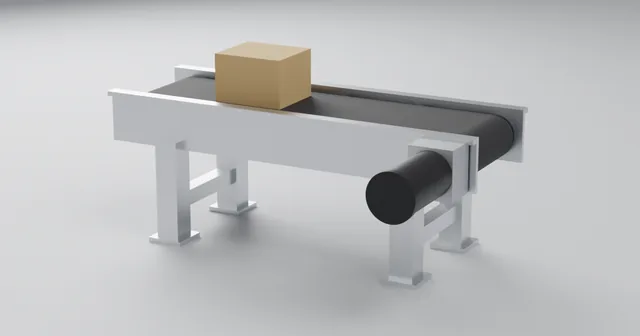
Park the part with its origin exactly on the conveyor base frame origin, tracking-direction coordinate 0 mm, and teach every target in that position: the runtime offset is zero there, so the stored coordinates are already relative to the part. Attach the part or fixture geometry to the conveyor mechanism, then place it so the two origins coincide on every axis, not only along the belt. Any standoff between the part origin and the base frame origin is copied into every target you store and repeats on every pick at runtime. The base frame carries the two definitions everything downstream depends on: the origin of the conveyor coordinate system and its tracking direction. Set both before the first target, because every offset the controller computes at run time lands along that axis, in that direction.
Why is a target taught there still correct downstream? #
Because the only difference between teach time and run time is one number: the offset the tracking system writes into the work object's user frame, computed as encoder counts since the part entered tracking divided by the counts-per-meter scaling. The part's geometry relative to the base frame is identical at every belt position, so a target stored with the part at the base frame differs from one taught after synchronization only by that runtime offset, which the controller supplies at the moment WaitWObj connects. Nothing in the teaching needs the belt to move. What the method does assume is that the scaling parameter converts encoder counts to meters correctly; the worked numbers for that are in the last section.
How do you set up the conveyor work object? #
Create the conveyor work object on the conveyor unit with ufprog FALSE, because the tracking system, not the program, writes its user frame at runtime. Give it a name you will recognize in the module, for example wobj_cnv1, and link it to the conveyor unit so WaitWObj can connect queued objects to it. With ufprog FALSE the user frame is marked as not programmable: neither the pendant nor the program can redefine it, so the tracking system stays the only writer of that frame, which is exactly the condition the base-frame method relies on.
How do you store each target in the conveyor work object? #
Set the work object reference to the conveyor work object before you create each target, and build the path only from targets stored that way, never from wobj0 targets. The reference is fixed at creation: a target created on wobj0 stores coordinates in the stationary base frame and will never follow the part, and converting it afterwards means editing target data by hand. The teaching loop:
- Jog the robot to the approach position with the part parked on the base frame origin.
- Set the target's reference, the work object field, to the conveyor work object before storing it.
- Store the target; repeat for the start, end and depart positions of the process.
- Assemble the tracked path from these targets only.
- Open the stored target data and confirm every entry lists the conveyor work object, not
wobj0, before building the program around them.
How do you connect and release the part in the program? #
Execute the whole tracked block between WaitWObj and DropWObj, and switch every move after the release back to wobj0, because a move that still references the conveyor work object at that point causes unexpected motion or a frame error. The skeleton, with the example names declared:
! Illustrative names for this example, all created in the virtual system:
!   wobj_cnv1 : work object on the conveyor unit, ufprog FALSE
!   tool_gun  : tool data of the end effector
!   pApproach, pStart, pEnd, pDepart : targets taught on wobj_cnv1
!                                     with the part on the base frame
!   pHome     : target taught on wobj0
PROC Track_Part()
    WaitWObj wobj_cnv1;
    MoveJ pApproach, v1000, z50, tool_gun\WObj:=wobj_cnv1;
    MoveL pStart, v500, fine, tool_gun\WObj:=wobj_cnv1;
    ! process motion between pStart and pEnd
    MoveL pEnd, v500, z10, tool_gun\WObj:=wobj_cnv1;
    MoveL pDepart, v1000, z50, tool_gun\WObj:=wobj_cnv1;
    DropWObj wobj_cnv1;
    MoveJ pHome, v1500, fine, tool_gun\WObj:=wobj0;
ENDPROC
One documented limit to respect inside that block: the controller's conveyor tracking application manual states that a stop or break instruction executed between WaitWObj and DropWObj raises an error the program must handle in an error handler. Keep the tracked block free of stops and put any recovery in the handler, not between the connect and the release.
How do you verify the targets without re-teaching? #
Move the part with the conveyor mechanism's own jog, not the program, and step the task in manual mode until it parks on WaitWObj; that reproduces the real-cell hold without running the belt from the program. Jogging the conveyor mechanism's joint directly carries the attached part along the tracking axis with the program idle, and reachability checks with the part at the far end of the working window confirm the robot still gets there. To exercise the sync input and the queue logic themselves, run the simulation normally and watch the connection happen; that phase is for verification, not for creating points.
The test that proves the result: connect the part at two different belt positions, once just past the sync switch and once near the end of the working range, and confirm the tool center point lands on the same part feature both times. Matching at both positions proves the targets are part-relative. Right at the first position and wrong at the second points at encoder scaling, not teaching; the numbers are next. On the real cell, do all jogging and teaching with the belt stopped and the energy isolated under the cell's lockout procedure, inside the safeguarding its risk assessment requires under ISO 10218; this article is not that assessment.
Which conveyor parameters must match before you blame the targets? #
Copy every conveyor unit parameter from the production backup before you re-teach anything, because most missed picks in a virtual cell are configuration, not targets: scaling, queue length, windows and direction sign.
| Parameter | What it controls | Symptom when wrong |
|---|---|---|
| Counts per meter (encoder scaling) | Conversion of encoder counts to belt travel | Tracked motion drifts ahead of or behind the part, growing with distance |
| Queue tracking distance | How far past the sync switch objects stay in the queue | Object dropped from the queue before the robot connects |
| Start window width | Window in which WaitWObj may connect to an object |
Program waits indefinitely, or connects too late for the process |
| Minimum and maximum distance | Valid working range along the belt for tracked motion | Motion supervision or work-area error mid-path |
| Adjustment speed | Rate at which the robot absorbs the tracking offset at connect | Jerky sync-in, overshoot, or sluggish lock-on |
Two of these rows connect to runtime behavior covered elsewhere: the margin the start window needs before the tracking distance limit is worked through in stop window margin before the tracking distance limit, and the signal chain behind the scaling is covered in wire the encoder to the controller.
The scaling parameter is where base-frame teaching either works or fails, so run the numbers once. Calculated example, not a measured result: the true scaling is 4000 counts per meter and the part has moved 1.5 m past the sync switch when the robot connects, so the encoder has delivered 1.5 m × 4000 counts/m = 6000 counts, and the controller shifts the work object 6000 counts ÷ 4000 counts/m = 1.5 m along the belt, exactly the distance the part traveled, and the taught positions land. Enter 3800 instead of 4000 and the same 6000 counts shift the frame 6000 ÷ 3800 = 1.58 m: the robot now runs 79 mm ahead of the part at that pick, and the error grows with every meter of travel. The decision: every value in that table comes from the backup of the controller you are copying, never from assumed defaults, and a scaling error is fixed in the parameter, not by re-teaching.
Questions asked
Does the part really have to sit exactly on the base frame origin?
Yes. A part parked off the base frame bakes its standoff into every target: parked 300 mm downstream of the origin, every stored coordinate sits 300 mm from where the real part will be at sync, and the error repeats on every pick. If the CAD part's origin is awkward, move the part body so its reference point lands on the base frame origin, or correct the part's local origin before storing the first target.
The robot moves away from the part the moment WaitWObj connects. Do I re-teach?
No. The targets are part-relative and survive this. The symptom means the tracking offset is applied with the wrong sign: the encoder direction or the base frame's tracking axis disagrees with the modeled belt travel, so the work object is shifted away from the part instead of toward it. Correct the direction definition in the conveyor base frame or encoder setup and keep the taught targets as they are.
Can I teach on a fixed work object and re-reference the targets later?
You can, and the geometry works out the same, but every re-reference is a manual edit of target data, and one missed target sends that move to a stationary frame while the part moves on. Teaching on the conveyor work object from the first point costs the same jogging time and leaves nothing to convert afterwards.
How do I get the real robot's conveyor settings into the virtual system?
Create the virtual system from the production backup so the option set and firmware version are inherited from the source controller, then restore the backup: the conveyor unit configuration, encoder scaling, tools and work objects come with it. A backup restores data but adds no options, so a system built by hand without the conveyor tracking option has no WaitWObj or DropWObj at all. The backup carries no CAD; rebuild the station geometry and attach the part to the conveyor mechanism yourself.